Ultimate IPTV Loader PRO
- 4.6
- Rating
- 10.00K
- Installs
- $3.99
- Price
 Analysis by App-foxy
When I first opened Ultimate IPTV Loader PRO, I had to adjust my expectations. This is not an entertainment app that arrives ready to play channels, and it is not a video editor for creating clips from scratch. It is a focused tool for loading an IPTV playlist that I already own or manage. That distinction shapes the entire experience: the creative starting point is not choosing content inside the app, but preparing a reliable source and then using the app as the viewing and management stage.
That narrow purpose is also the reason I can see this app being useful. If you already have a legitimate playlist and want a dedicated IPTV player rather than a general-purpose video app, the workflow is direct. If you are looking for channels, subscriptions, or a ready-made library, you will be disappointed immediately. The app is a loader, not a content provider. It does not arrive with a list or channels included, so your own playlist is the essential starting material.
Antonio Dimitri is the developer behind this Android app, which sits in the video players and editors category. It is available for $3.99, carries an Everyone age rating, and requires Android 5.0 or later. Those details make it accessible to a wide range of Android devices, although the practical quality of the experience will still depend heavily on the playlist, the network connection, and the device being used.
You May Also Like

 Blood Strike: 2.5 Anniversary
Blood Strike’s Loadouts Turn Every Drop Into a Tactical Gamble
A close look at Blood Strike’s custom loadouts: how fast access to signature weapons reshapes its battle royale rhythm, rewards preparation, and narrows the gap between fights.

 Pandora - Music & Podcasts
Pandora’s Music Is Easy to Start, but Harder to Recover
Pandora’s strength is its low-effort path from a seed to a station. Its weak spot is how much confidence it asks you to place in connection, setup, and quiet recovery.

 8 Ball Pool
 Is Built on Rivalries, Rematches, and Routine
A close look at the rivalries, rematches, shared routines, and unanswered safety questions that turn a quick pool match into a persistent mobile community.

 Samsung Music
’s Quiet Strength Is Playing What You Already Own
Its reach comes less from spectacle than from dependable access to a personal library. That simplicity is both the app’s strongest retention engine and its ceiling.

 AccuWeather: Weather Radar
AccuWeather Review: A Quick, Clear Forecast for Everyday Decisions
For everyday plans, the best forecast is the one you can understand quickly. AccuWeather makes rain timing, radar, and local conditions easy to act on, with a few trade-offs.

 Hill Climb Racing
Why Hill Climb Racing Still Turns Crashes Into One More Run
A tiny car, a bumpy hill and one more upgrade: Hill Climb Racing keeps resurfacing because its simple chaos makes every near-miss feel personal.
More From Our News Desk
View All News


From playlist preparation to everyday viewing
I find the most useful way to approach this app is to separate playlist preparation from everyday viewing. A tidy, current source can make the loader feel straightforward, while a messy one can turn even a simple viewing session into troubleshooting. I’ll focus on how I’d make that handoff more dependable, then look at the kind of daily setup where the effort pays off.
The real creative starting point is your own source
Calling this a creative tool may sound unusual for an IPTV loader, but there is a useful way to think about it. The output you are managing is a personal viewing setup: a playlist organized around the channels or streams you are allowed to use. Ultimate IPTV Loader PRO does not create that material. Instead, it gives me a place to bring the finished source and turn it into a practical viewing workflow.
That means the most important preparation happens before opening the app. I need to know where my playlist comes from, whether it is current, and whether it is formatted in a way the loader can use. This is a meaningful trade-off. The app keeps its purpose clean by avoiding a built-in catalog, but it also puts responsibility on me. A broken or outdated playlist can look like an app problem even when the real issue is the source.
For a household that already uses a legitimate IPTV service, this separation can be helpful. I can treat the playlist as the content layer and the app as the playback layer. That makes it easier to understand what needs fixing when something goes wrong. If the entire list fails, I would check the source first. If only one stream refuses to play, the problem may be specific to that entry. This simple distinction saves time compared with troubleshooting a service that hides all of its components behind one interface.
A less obvious benefit is that the app can fit into a more deliberate personal media setup. Someone might maintain one playlist for everyday channels and another for a particular location, event, or device. The loader becomes the point where those prepared sources are brought into use. I would not recommend creating a complicated collection unless I had a clear reason, because every additional list creates another thing to maintain. Still, for users who already organize their IPTV access this way, the app’s focused role makes sense.
Loading is simple in concept, but preparation matters
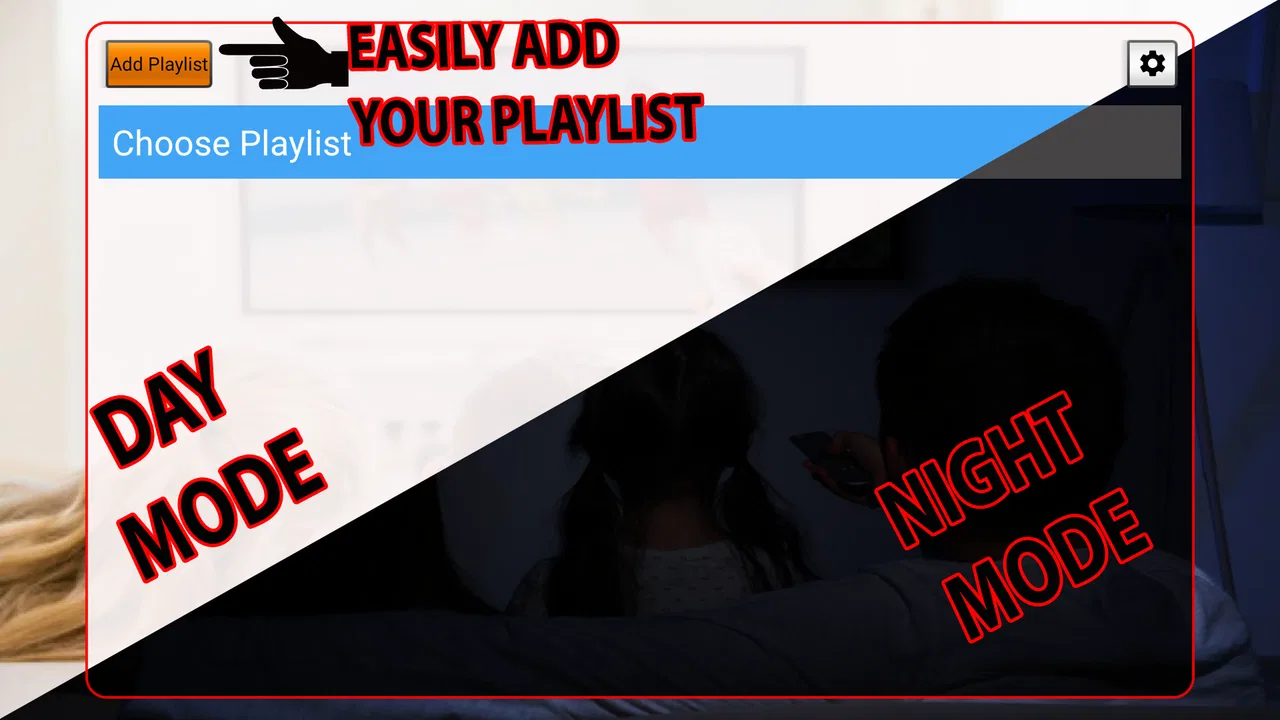
The basic workflow is easy to understand: provide your own playlist, load it, and use the resulting entries for viewing. What matters is approaching that process methodically. I would start with a small, known-good playlist rather than importing a large collection immediately. That gives me a clean test. If the smaller source works, I can add more entries without guessing whether a failure comes from the app or from one troublesome item in a much larger list.
This is one of the practical habits I found most useful. A long playlist can create the illusion that the app is doing a lot of work, but quantity does not equal reliability. A carefully maintained list with clear names is more valuable than a crowded list full of expired streams. I would also keep a backup of the original playlist before editing it. That way, removing a bad entry or changing its label does not permanently destroy the source I may need later.
The app’s price is another part of the starting decision. At $3.99, I see it as a small paid utility rather than a platform subscription. That can be appealing if I already have the content source and want to avoid paying for an elaborate media ecosystem. On the other hand, the purchase does not remove the work of finding, maintaining, or legally using a playlist. Anyone expecting one payment to provide programming will be choosing the wrong product.
Managing the making process without confusing the tool’s role
Once the playlist is loaded, the “making” process is really about turning raw entries into a usable viewing arrangement. The app does not replace a playlist editor or a content-management system. I would therefore do the heavier organization outside the app if the source needs extensive cleanup. Rename unclear entries, remove duplicates, and separate channels logically before loading the final version. This approach reduces friction and makes the in-app experience easier to navigate.
That workflow is especially useful on a phone, where editing a long text-based playlist can be awkward. I prefer to prepare the source on a larger screen when possible, then use the Android app for loading and viewing. The loader is best treated as the delivery end of the process, not as the only place where every correction must happen.
There is also a useful diagnostic habit here: change only one thing at a time. If a stream fails, I would not immediately replace the entire playlist. I would test another entry from the same source, then compare the result with a known working item. This gives me a clearer idea of whether the issue is a single stream, the list itself, or the network. A focused loader rewards this kind of orderly troubleshooting because it does not bury the source behind a large collection of unrelated features.
Iteration: refining a playlist instead of blaming playback
IPTV is rarely a one-time setup. Streams change, channel names become outdated, and a list that worked last week may need attention today. Ultimate IPTV Loader PRO is therefore most useful when I treat the playlist as something that needs occasional iteration. I would keep notes about which entries are dependable, which ones are slow to start, and which should be removed rather than repeatedly tested.
This is a concrete trade-off between control and convenience. A managed streaming app usually handles the catalog and maintenance for me, while this loader gives me more direct control but expects more involvement. For a technically comfortable user, that control can be worthwhile. For someone who wants to open an app and browse a polished library without touching sources, it becomes unnecessary work.
One effective routine is to test the playlist before an important viewing session rather than discovering problems at the last minute. I might load it earlier in the day, check a few entries from different parts of the list, and only then rely on it for a planned program. This does not guarantee that every stream will remain available, but it reduces the chance of finding out that the entire setup needs attention when I am already sitting down to watch.
I also recommend keeping expectations realistic about what the loader can fix. If a source has unstable streams, missing metadata, or inconsistent naming, the app cannot magically turn it into a polished service. Its strength is handling the playlist I provide, not repairing the quality of the material inside it. That is an important limitation, and it is more significant than the simple question of whether the interface feels attractive.
A realistic everyday scenario
Imagine that I use a legitimate IPTV playlist for local and family channels and want to watch from an Android tablet in the kitchen. Beforehand, I prepare a short list containing only the entries I actually use, check that the source is current, and load it into the app. During the day, I can open the loader instead of searching through a general video application that has no understanding of my playlist.
If one channel does not start, I compare it with another entry. If several fail, I check the playlist source and the connection before assuming the player is at fault. Later, if I notice that the list has become cluttered, I clean the source externally and load the revised version. This scenario shows where the app fits best: it is a practical endpoint for a user who already has organized access, not a shortcut to discovering television content.
Another use case is a spare Android device dedicated to media playback. Because the minimum requirement is Android 5.0 or later, the app can suit older compatible hardware better than some newer, heavier applications. I would still judge the result by the device’s performance and network reliability, but the broad system requirement makes it worth considering when repurposing an older phone or tablet.
Handoff to the final viewing setup
The final handoff is straightforward in principle: the prepared playlist moves into the loader, and the loader becomes the place where I access those streams. The quality of that handoff depends on how cleanly the source was prepared. Clear labels matter because they reduce the time spent guessing what each entry represents. A smaller, organized list can also make everyday selection less frustrating than a huge unfiltered collection.
I would be careful when moving between devices. A playlist that works on one Android device may still behave differently on another because of network conditions, device performance, or the way the source responds. The app itself should not be treated as a guarantee that every stream will behave identically everywhere. Testing the actual device intended for viewing is more useful than assuming that a successful setup on a different phone proves everything is ready.
This is also where the app compares clearly with the usual alternatives. A mainstream streaming application is better when I want licensed content, search, recommendations, account-based continuity, and minimal setup. A full media-center solution may be better when I want extensive customization, libraries, remote controls, and a broader home-theater workflow. A generic video player may be enough for individual files or common online videos. Ultimate IPTV Loader PRO makes the strongest case when the specific requirement is loading a personal IPTV playlist without paying for features unrelated to that task.
The compromise is that I give up some of the polish and automation found in larger platforms. I should not expect the same discovery experience as a subscription service, nor should I assume that the app will manage my source for me. Its advantage is focus; its weakness is that focus leaves many surrounding responsibilities with the user.
Who should use it, and who should skip it
I would recommend this app to Android users who already have a legitimate IPTV playlist, understand that they are responsible for the source, and want a dedicated way to load it. It is also a reasonable option for someone building a simple viewing setup on an older compatible Android device, provided the playlist and connection are dependable.
I would skip it if I am starting with no playlist and expect channels to appear after installation. I would also choose a different option if I mainly watch on iOS, need a polished cross-device service, or want a media platform that supplies search, recommendations, and content management in one place. The app’s Everyone rating does not change that practical boundary: being broadly accessible is not the same as being suitable for every viewing goal.
The public response gives the utility some context. It holds a 4.6 average from around two thousand ratings, with roughly seventy reviews, and has passed ten thousand installs. I read those figures as evidence that the focused concept works for a real group of users, but not as a promise that every playlist will behave well. IPTV performance is unusually dependent on external sources, so personal setup quality matters more here than a store score alone.
Current state and long-term value
The app was released on May 6, 2019, and its current version is 2.156. I would pay attention to the version shown on the device when installing, particularly if I am moving from an older setup or using an older Android phone. The stated Android requirement makes the app approachable, but compatibility on paper is only the first check; the actual playlist remains the central variable.
For long-term use, I would keep the workflow intentionally simple. Maintain the source separately, make a backup before editing, test a few representative entries, and avoid judging the loader by a single unstable channel. Those habits are more valuable than repeatedly reinstalling the app. They also make it easier to decide whether a different player is needed: if the same clean playlist works elsewhere but not here, switching tools becomes a reasonable next step.
My final view is positive but specific. Ultimate IPTV Loader PRO is a practical handoff tool for users who already control their IPTV source. I like that it does not pretend to be a channel marketplace or wrap a simple task in a large entertainment platform. The $3.99 purchase is easy to understand, and the app’s focused purpose can be an advantage when I want a direct route from playlist to viewing.
At the same time, it is not a complete IPTV service. The user supplies the playlist, maintains its quality, and handles much of the troubleshooting. That makes the experience more hands-on than a conventional streaming app. If that responsibility sounds reasonable, I think this is a sensible Android utility to try. If I want content discovery, automatic maintenance, or a ready-to-watch catalog, I would choose a broader alternative instead.
After using it as a playlist loader rather than judging it as a full media platform, I find the product’s boundaries clear and useful. It performs best when the source is already prepared and the goal is dependable access to that source. For that particular job, the app earns its place; for anything beyond it, I would look elsewhere.
FAQs for Ultimate IPTV Loader PRO
01What is Ultimate IPTV Loader PRO and what does it do?
Ultimate IPTV Loader PRO is an IPTV player designed to load and organize television channels, movies, series, and other streaming content supplied through compatible playlists or service providers. It generally does not provide channels or copyrighted media by itself. After installation, users usually need to add an M3U playlist, Xtream Codes details, or another supported source before they can watch anything.
02Does Ultimate IPTV Loader PRO include live TV channels or subscriptions?
The application should be treated as a media player rather than a television subscription. Installing it does not normally grant access to premium channels, sports events, movies, or series. You must obtain a playlist or login from a legitimate IPTV provider, and any subscription fees, channel availability, regional restrictions, and streaming quality depend on that provider rather than on the loader itself.
03Is Ultimate IPTV Loader PRO available for Android and iOS devices?
Availability can vary depending on the official publisher, store policies, and the specific version being promoted. Before downloading, check whether the application is listed through a legitimate Google Play or Apple App Store page and confirm the supported operating system version. Avoid unofficial APK files, modified packages, or unknown installation links, since they may contain security risks or behave differently from the original app.
04What internet connection and device features are recommended for smooth playback?
Streaming performance depends mainly on the quality of your IPTV source and internet connection. A stable Wi-Fi or mobile-data connection is recommended, while higher-resolution streams require more bandwidth and a capable device. If playback buffers, test another network, reduce video quality when the provider allows it, close demanding background apps, and verify whether the same playlist works correctly in another compatible player.
05Is Ultimate IPTV Loader PRO safe and legal to use?
The legality of using the application depends on the content you access and the source of your playlist or account. Using a player with properly licensed IPTV services is generally different from accessing unauthorized broadcasts. Download the app only from a trustworthy source, review requested permissions and privacy information, and never share payment details or login credentials with unverified providers. The app itself cannot make illegal content legal.
Pros
- Supports multiple IPTV playlist formats for flexible setup.
- Clean interface makes channel navigation quick and straightforward.
- Favorites help keep frequently watched channels easy to access.
- Handles large channel lists without unnecessary clutter.
- Useful playback options improve everyday viewing convenience.
Cons
- Requires a valid IPTV subscription or playlist to provide content.
- Streaming quality depends heavily on your provider and internet connection.
- Some playlists may load slowly or contain broken channel links.
- Compatibility can vary between devices
- Android versions
- and players.
- Advanced settings may feel confusing for first-time IPTV users.

Ultimate IPTV Loader PRO
Gallery